Differential Analysis#
CFTK separates feature-level differential analysis from region-level DMR analysis.
Install the downstream statistical dependencies before using differential or DMR commands:
python -m pip install ".[analysis]"
Feature-Level Analysis#
For a new project, use the managed cohort-level workflow. It performs preflight, creates configured occupancy/WPS matrices when needed, records input signatures and exact workflow choices, runs PCA and differential testing, and refreshes the final report:
cftk analyze --preset differential
Select one or more modalities without editing cftk_init.json:
cftk plan --preset differential --modality cpg
cftk analyze --preset differential --modality cpg
cftk analyze --preset differential --modality cpg occupancy wps
The override is recorded in the plan and run manifest. Known precursor stages are added before the comparison, unchanged matrices are reused automatically, and a changed matrix checksum invalidates stale differential results. Missing requested inputs fail preflight instead of being silently skipped.
Default matrix locations are derived from output_dir and the modality name.
For example, cpg uses:
<output_dir>/results/1_process/5_merged_matrix/cpg_matrix.tsv
DMR Analysis#
For a new project, use the managed DMR preset. It resolves all samples from the two explicit sample-sheet roles by default, validates the CpG bedGraphs, records their content signatures, and refreshes the final report:
cftk analyze --preset dmr
To inspect the tool, reference, sample, and output contract before running:
cftk plan --preset dmr
The optional analysis.dmr.samples mapping selects a subset by group. The
resolved selection is recorded in the plan and manifest; an invalid sample
name or missing selected bedGraph fails preflight. BedGraph files are resolved
from:
<output_dir>/results/1_process/4_methylation/
Expected Outputs#
For each selected modality, CFTK writes the feature-level table and PCA intermediates under one modality directory:
results/3_differential/<modality>/
|-- differential_result.tsv
|-- pca_coordinates.txt
|-- pca_variance.txt
|-- pca.png / pca.pdf
|-- violin.png / violin.pdf
`-- heatmap.png / heatmap.pdf
The DMR stage adds results/3_differential/dmr/metilene_input.bedGraph,
dmr_raw.bed, dmr_annotated.bed, and dmr_volcano.png/PDF. The
managed preset also regenerates results/report/report.html. If a selected
CpG bedGraph changes, CFTK reruns DMR instead of reusing stale calls; an
unchanged stage resumes automatically. Run vis --mode diff dmr only when
regenerating plots from already trusted DMR outputs.
The refreshed HTML report shows each discovered modality, result-row count, effect direction, full-TSV link, the ten lowest-q rows for navigation, and the PCA/violin/heatmap figures. The compact table does not apply a significance threshold; use the full result table for interpretation.
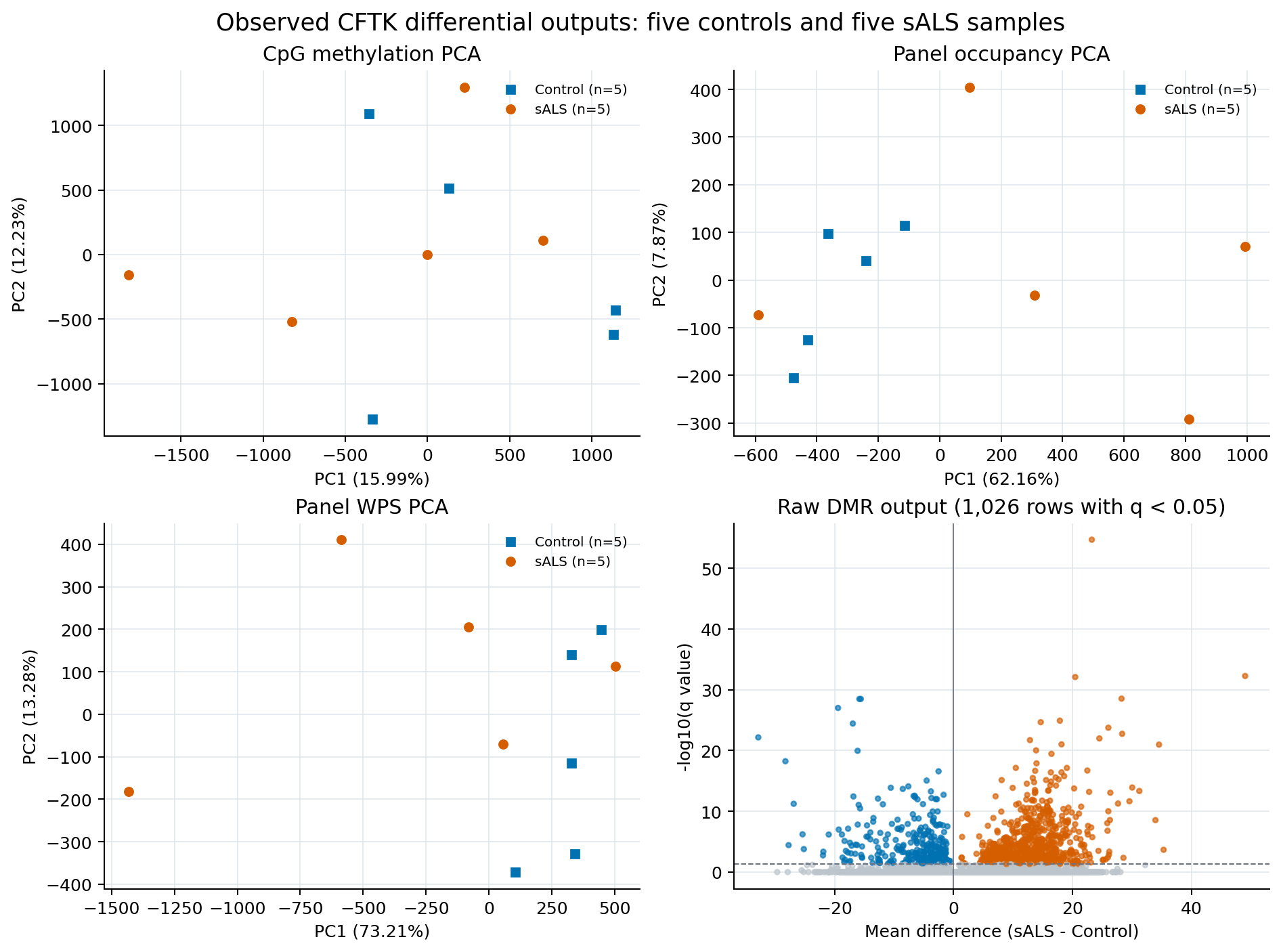
Observed output from five controls and five sALS samples in the completed
downstream technical example. The panels show the three configured PCA
outputs and raw DMR calls (q < 0.05 is highlighted). This is a workflow and
file-contract example, not biological or clinical validation; it must not be
used to choose a cutoff or claim group separation. The full tables and
provenance files above remain authoritative. The sanitized aggregate
metadata can be downloaded as
JSON.#
Regenerate Plots#
cftk --config cftk_init.json vis --mode diff dmr
Advanced Direct Command#
The original direct command remains available for compatibility:
cftk --config cftk_init.json diff --modality cpg
It writes the same statistical tables and figures but bypasses managed preflight, bedGraph-sensitive resume, evidence, and immutable analysis-run provenance. Prefer the managed DMR preset for reproducible new work. DMR is a cohort-level stage; it is not split into one sample per scheduler job.