Beginner Workflow#
cftk run is the recommended first workflow for a schema-v2 project. From
the project directory, initialization and execution require no workflow
parameters:
cftk init
cftk run
The command runs synchronously in the current shell. It performs its own
read-only doctor preflight, stops at the first failed stage boundary, validates
every required artifact, and returns nonzero when the run is incomplete. A
WARN from doctor remains visible but does not block execution; a FAIL
does.
Projects must have a compact schema-v2 cftk_init.json, its matching
cftk.lock.json, homogeneous FASTQ or homogeneous BAM inputs, and the
validated Trim Galore, bwa-meth, Sambamba, and MethylDackel toolchain. Use the
individual expert commands for legacy JSON, mixed input types, or alternative
tools.
Default Stages#
The default stage order is deliberate. Fragment-length QC runs before the QC
summary so qc_summary.tsv can include its median fragment-length metrics.
Stage |
Purpose |
Required evidence before the next stage |
|---|---|---|
|
Trim and inspect FASTQs |
Trimmed R1/R2 FASTQs; per-mate Trim Galore reports and FastQC HTML/ZIP; trimming MultiQC HTML. |
|
Align bisulfite reads |
Per-sample BAM and BAI; |
|
Mark duplicates and measure target performance |
Per-sample marked BAM, BAI, and Sambamba metrics; content-keyed Picard interval list; hybrid-selection and per-target coverage tables; alignment, insert-size, and GC-bias metrics; Picard completion marker; insert-size, GC-bias, and read-length PDFs. |
|
Call merged CpG methylation |
Per-sample M-bias table, parsed OT/OB bounds, CpG bedGraph, OT/OB SVGs;
merged |
|
Measure fragment lengths |
Per-sample raw fragment-length CSV and histogram PNG; combined fragment-length PNG and PDF. |
|
Assemble QC metrics |
|
|
Inspect methylation distribution |
Methylation-distribution PNG and PDF. |
Expected Outputs#
The stage contract above is the beginner checklist: do not move to the next
stage until its required files and figures are present in the run manifest.
The full output inventory is also written to expected-outputs.tsv and
figures.tsv under the attempt directory, so the checklist can be reviewed
without guessing filenames.
Full-Depth 10-Sample Technical Validation#
The figures below come from a completed full-depth run of 10 preselected technical samples: 5 controls and 5 sALS samples. Before computation, CFTK selected the minimum, first quartile, median, third quartile, and maximum paired compressed FASTQ sizes within each group. This deterministic size-spanning selection was not random and was not based on workflow results.
This subset tests execution, checkpoint recovery, artifact contracts, and expected output appearance across varied input sizes. It is not a cohort-wide biological analysis, evidence that the selected samples represent either population, or a source of clinical or scientific acceptance thresholds. No sample was filtered from the displayed results.
The final validation summary reported:
samples:                         10 (5 control, 5 sALS)
validated stage records:        70 (7 per sample)
required artifacts:             410
missing required artifacts:     0
combined CpG matrix:             5,970,802 rows x 10 samples
zero-command resume checks:     10 of 10 passed
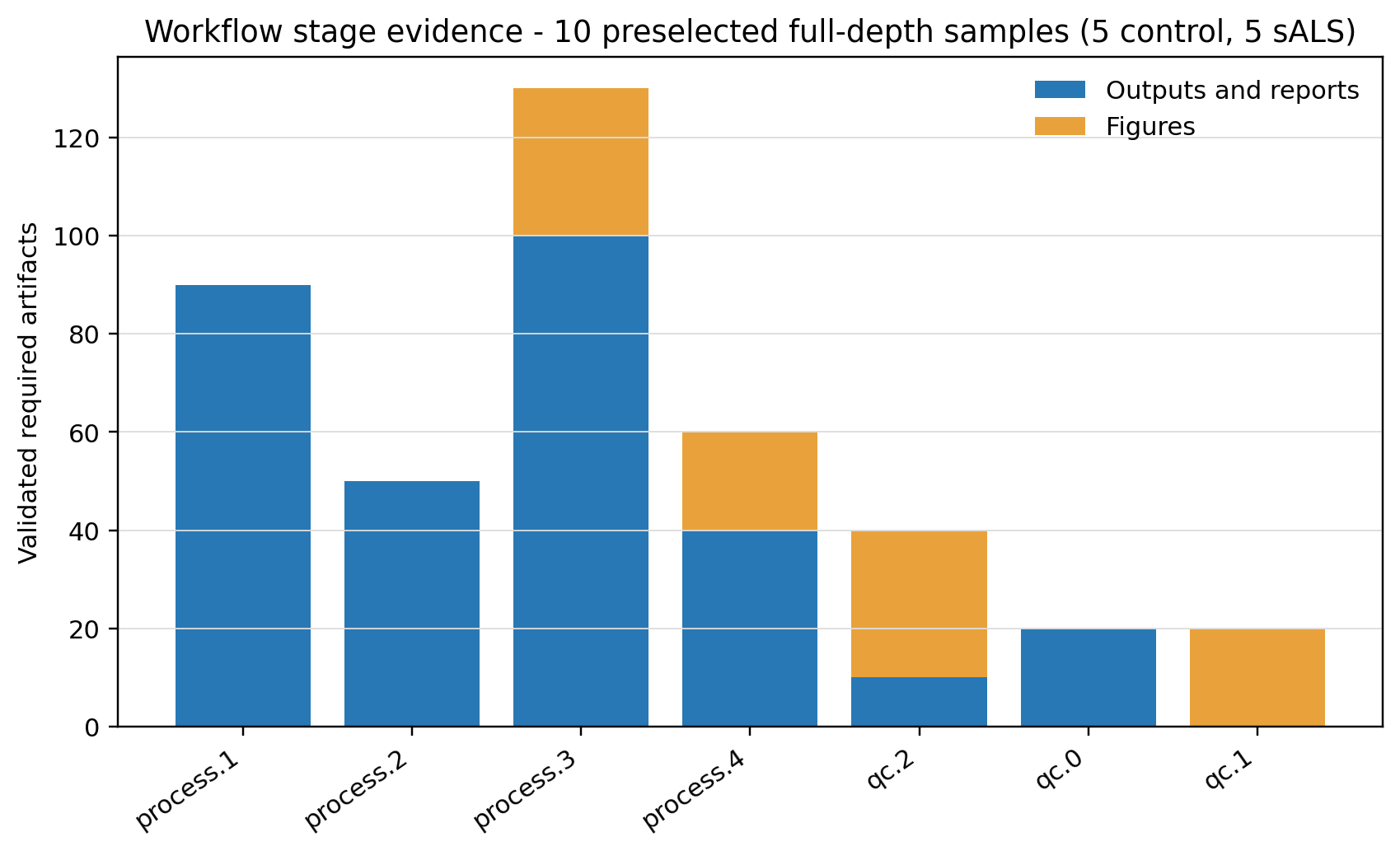
This is the output contract for all seven default stages. Bars total the required output/report and figure files across all ten isolated projects; every counted artifact was present when aggregation completed.#
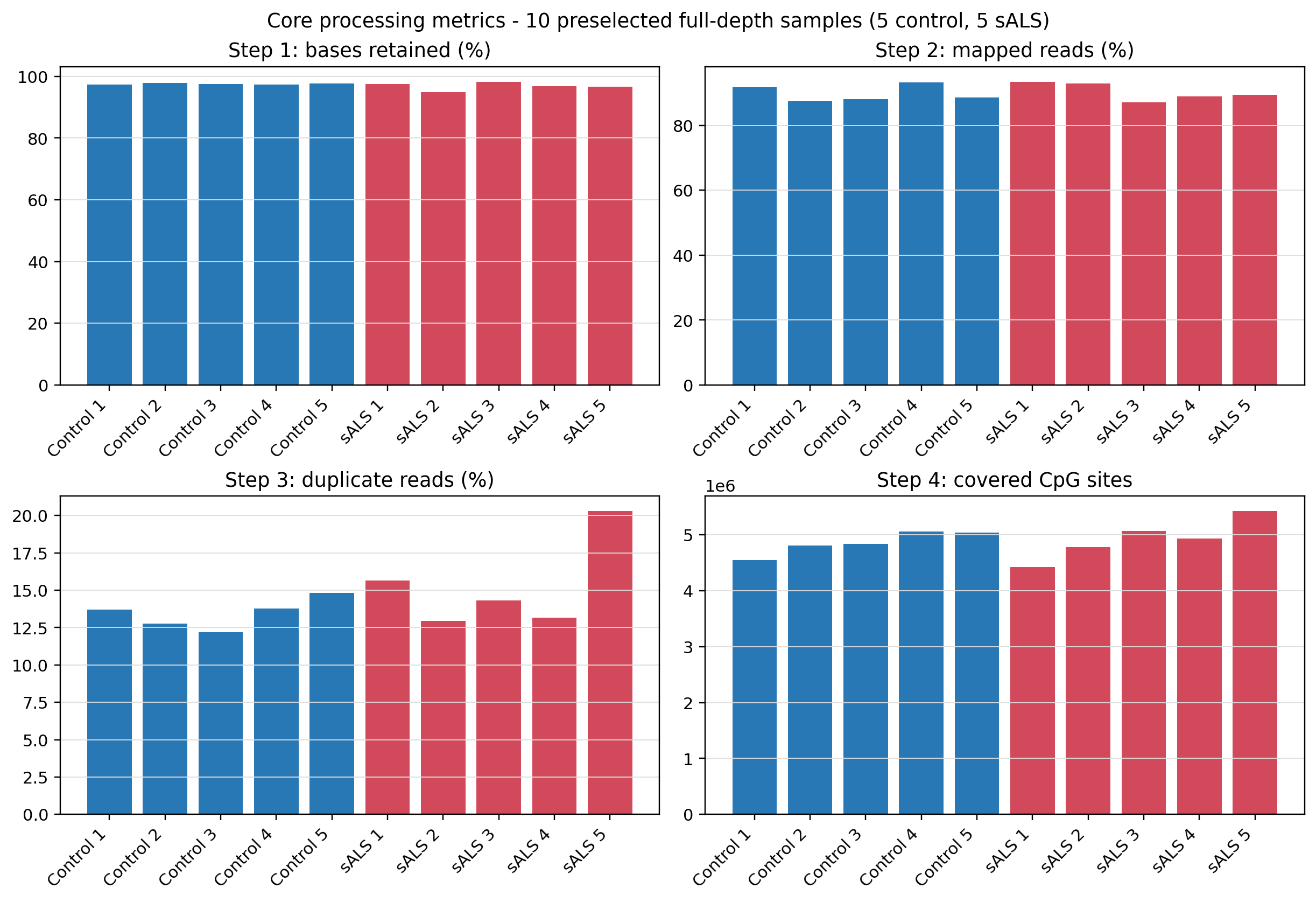
process.1 through process.4 are represented directly by retained
bases, mapped reads, duplicate reads, and covered CpG sites. These panels
show expected per-sample outputs, not pass/fail cutoffs or group tests.#
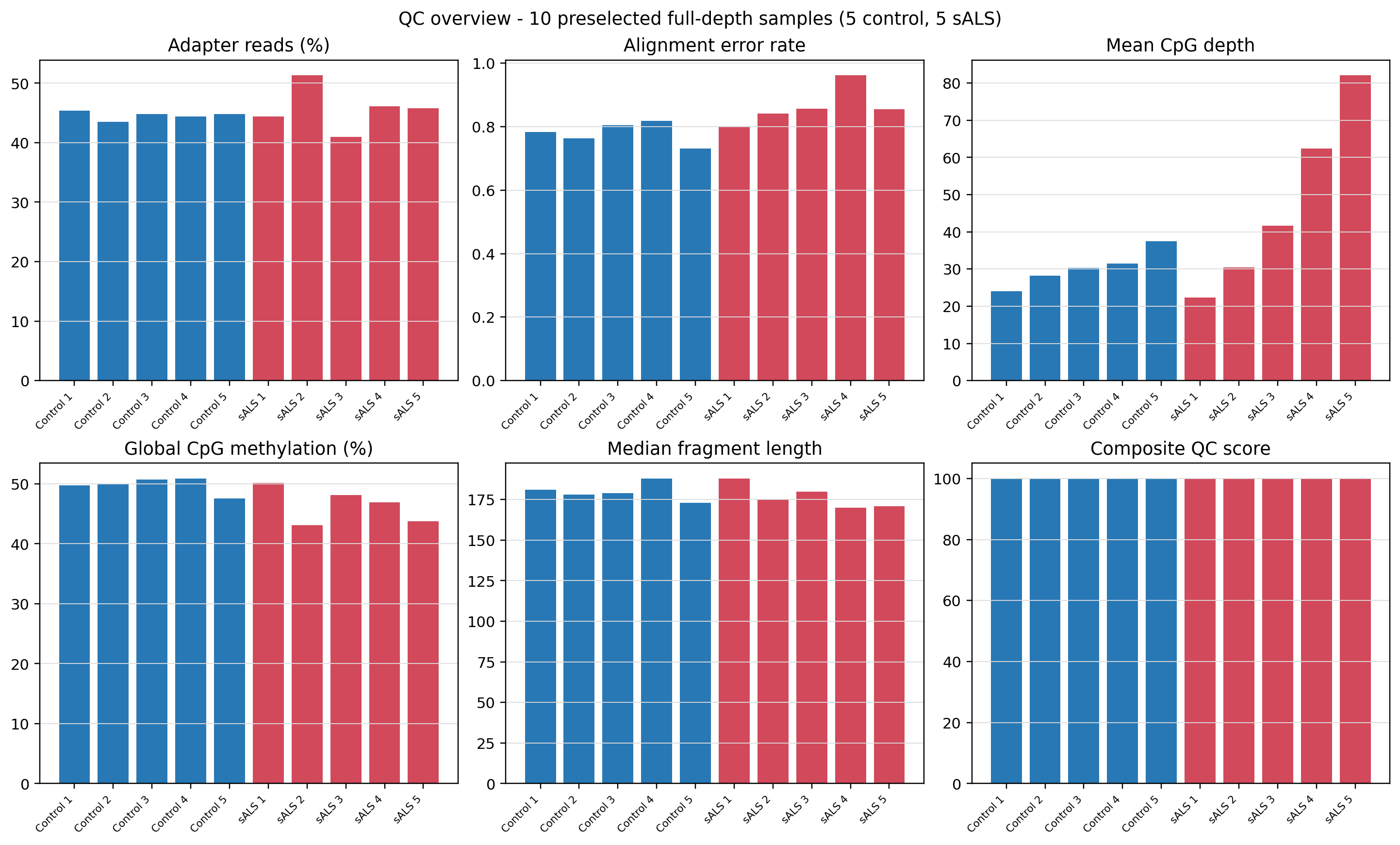
qc.0 combines selected trimming, alignment, methylation, and fragment
metrics. Median fragment length is populated for all ten samples. The
composite score uses the configured default weights and is not a release,
biological, or clinical acceptance decision.#
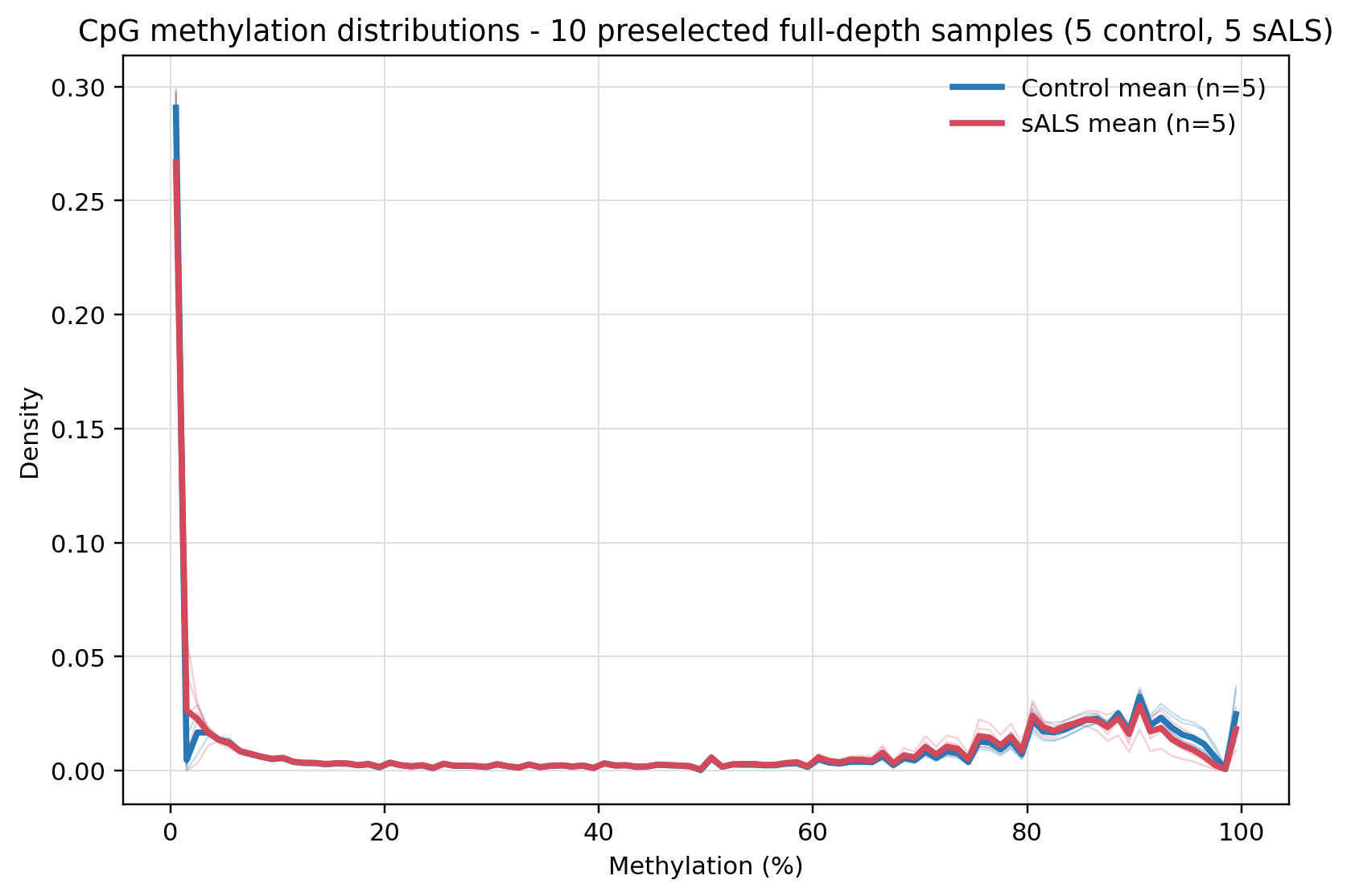
process.4 produced the CpG values and qc.1 rendered their
distributions. Thin lines are individual technical samples and thick lines
are group means for visualization only; no differential test is shown.#
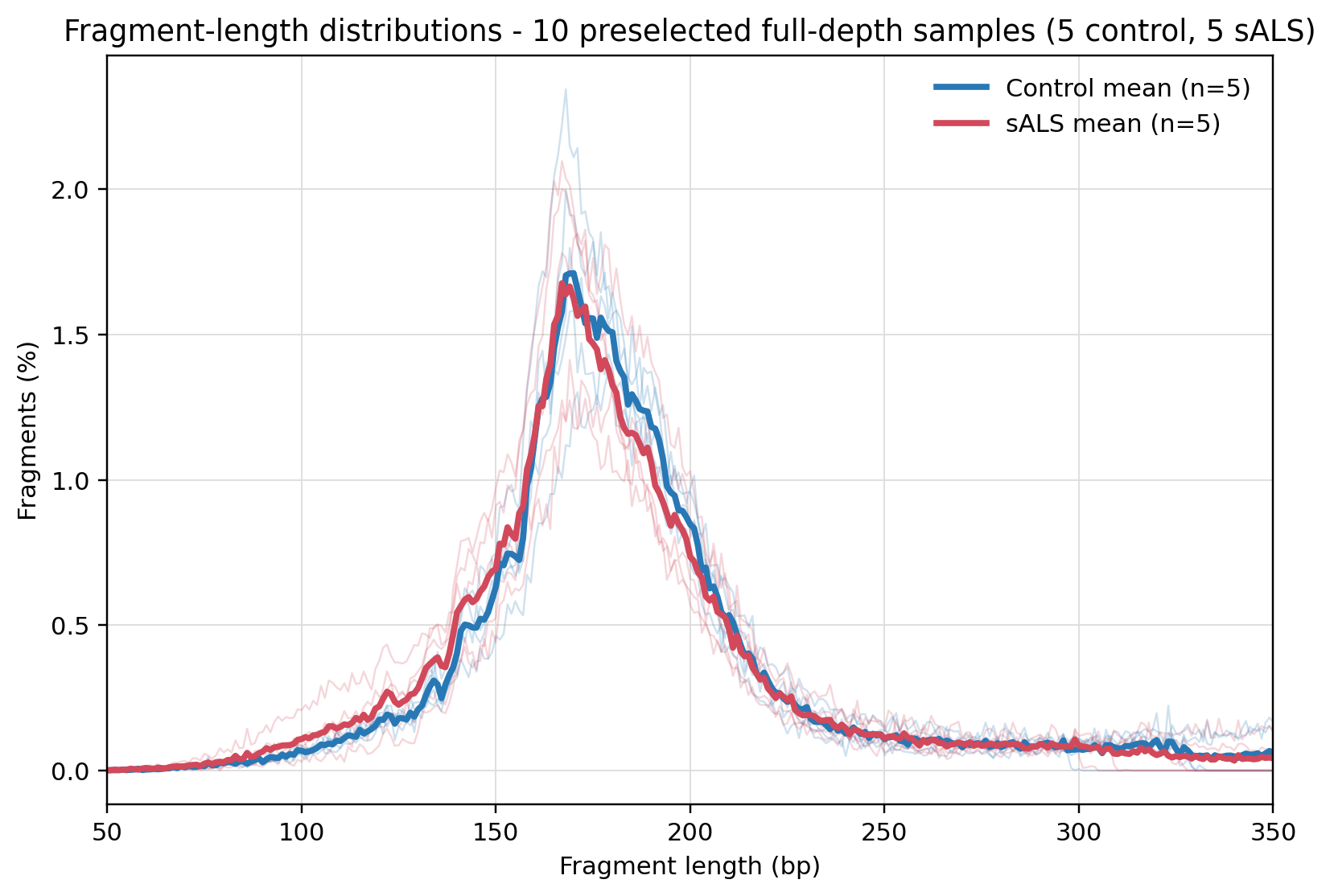
qc.2 produced one fragment-length table and plot per sample plus the
combined view. Thin lines are samples and thick lines are descriptive group
means. Interpret the nucleosomal profile with library preparation and the
other QC evidence.#
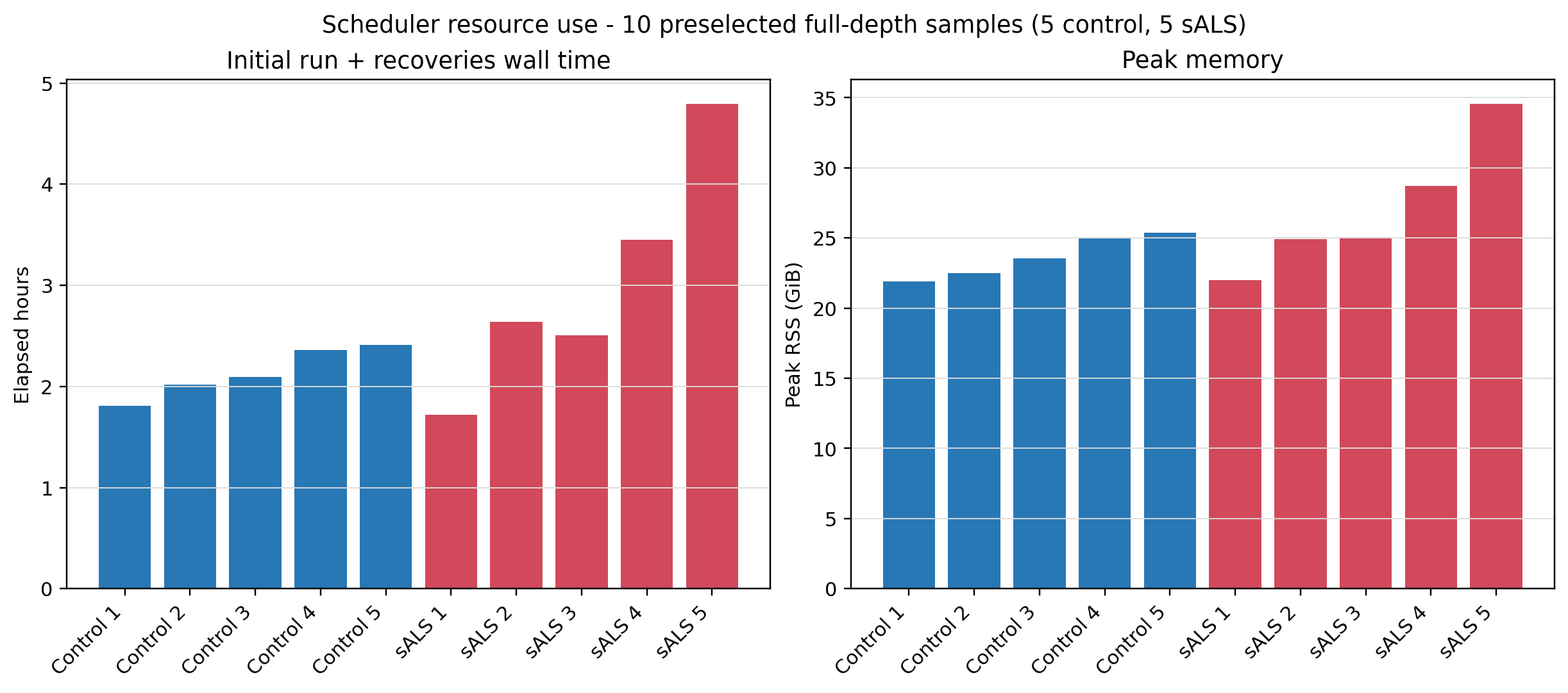
The resource history includes the initial execution and two checkpoint recoveries used while validating package fixes. It demonstrates isolated per-sample parallel execution and observed memory use; cumulative elapsed time is not a clean-run benchmark or a resource guarantee for another cluster.#
Detailed Two-Sample Output Examples#
The following are sanitized renders from only two preselected example samples: one control and one sALS sample from the deterministic Phase 13 smoke test. They were not selected by a recorded random-sampling procedure and must not be interpreted as representative cohort distributions, biological group differences, or acceptance thresholds. They show only what a beginner can expect the workflow outputs to look like; the actual run directory contains the full-resolution reports, tables, and per-sample files listed in the stage contract above.
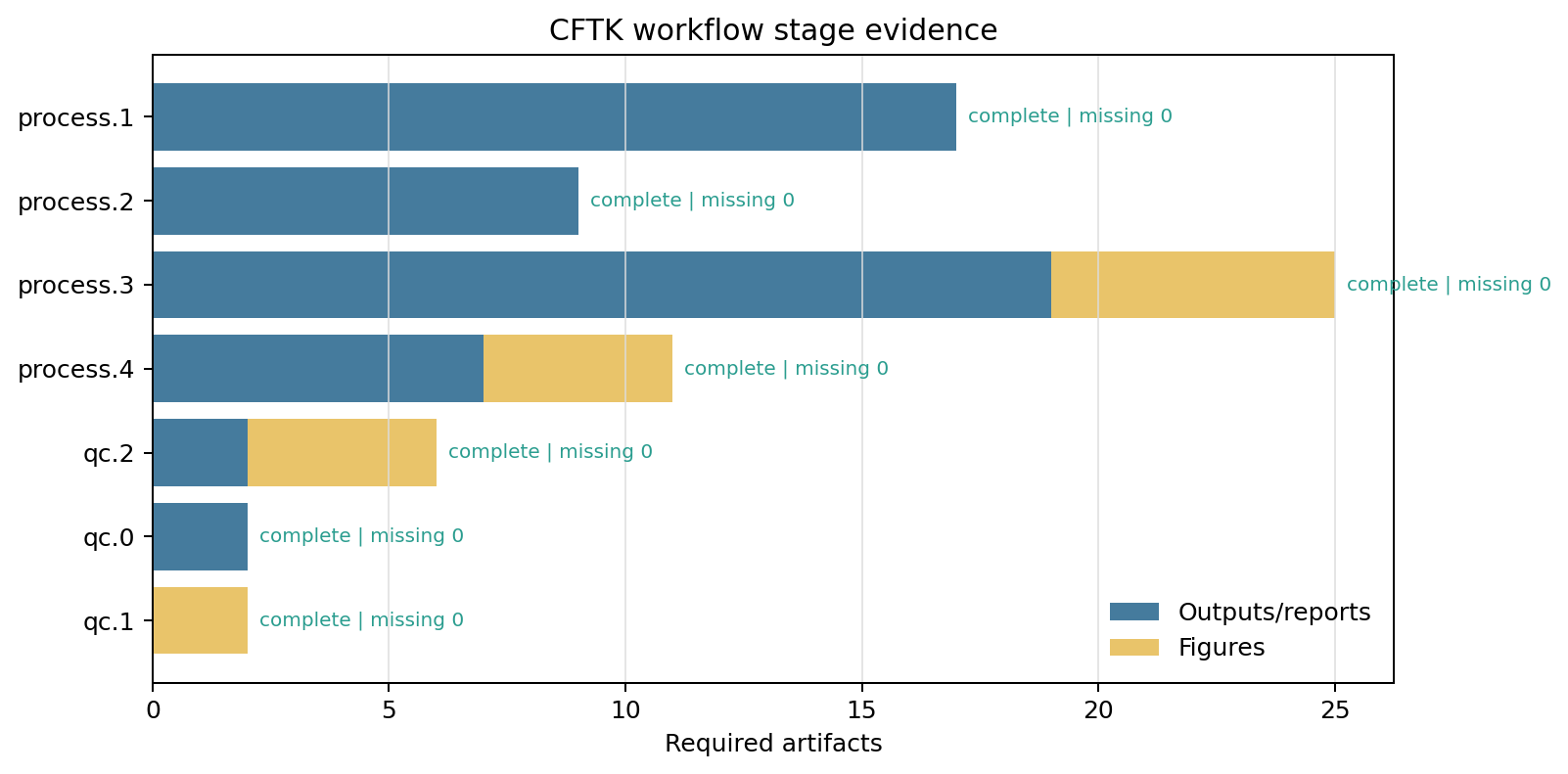
For these two example samples, the stage-evidence view confirms that every
stage has the expected output and figure inventory. missing 0 means the
required artifact contract was satisfied for this technical run only.#
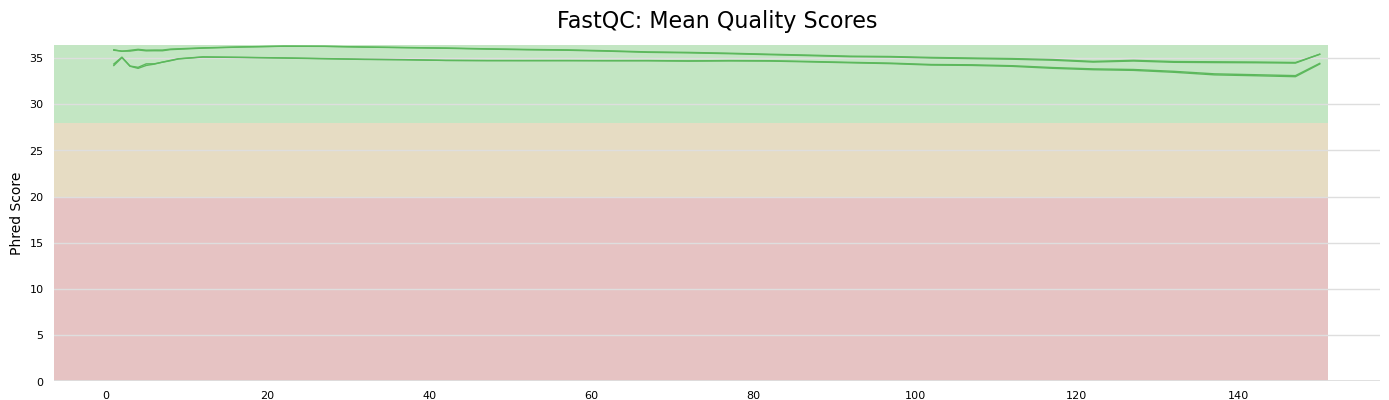
process.1 produces FastQC and MultiQC quality plots in addition to the
trimmed FASTQs and text reports.#
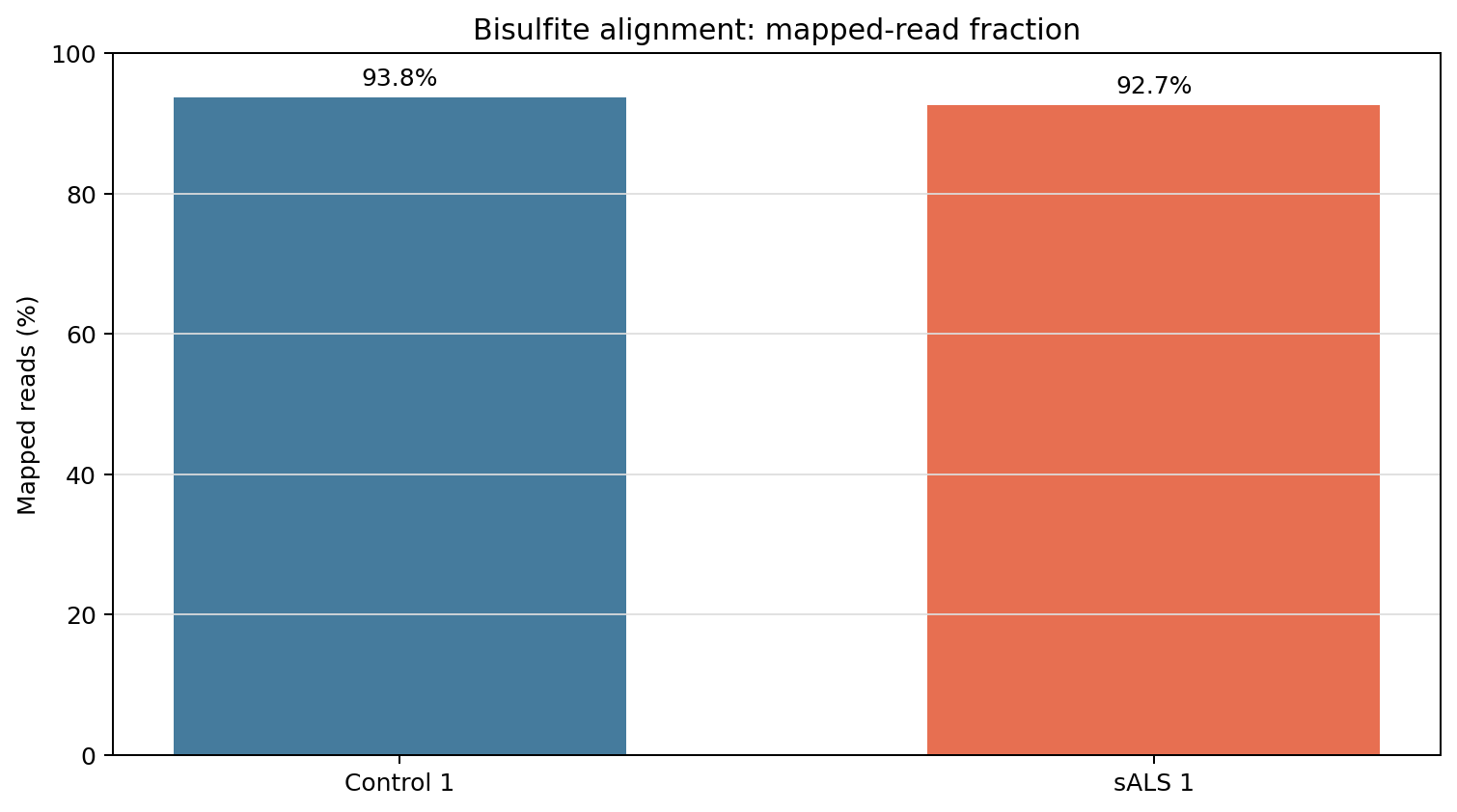
process.2 produces BAM/BAI files and alignment tables; the MultiQC
report supplies plots such as mapped-read fraction.#
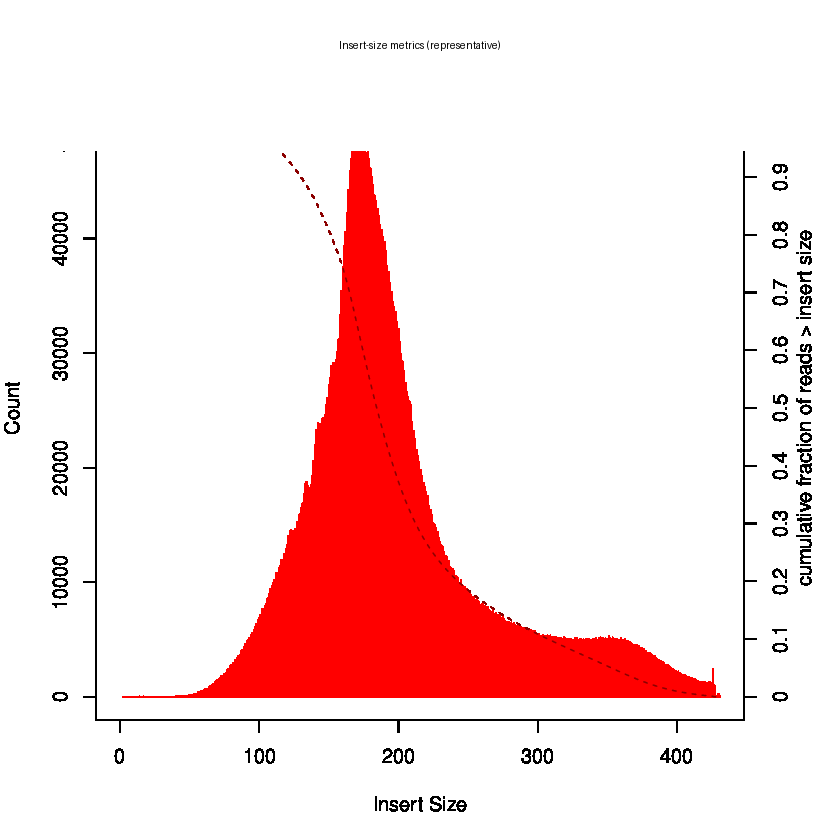
process.3 produces duplicate-marked BAMs, Sambamba/Picard metrics, and
Picard insert-size, GC-bias, and read-length figures.#
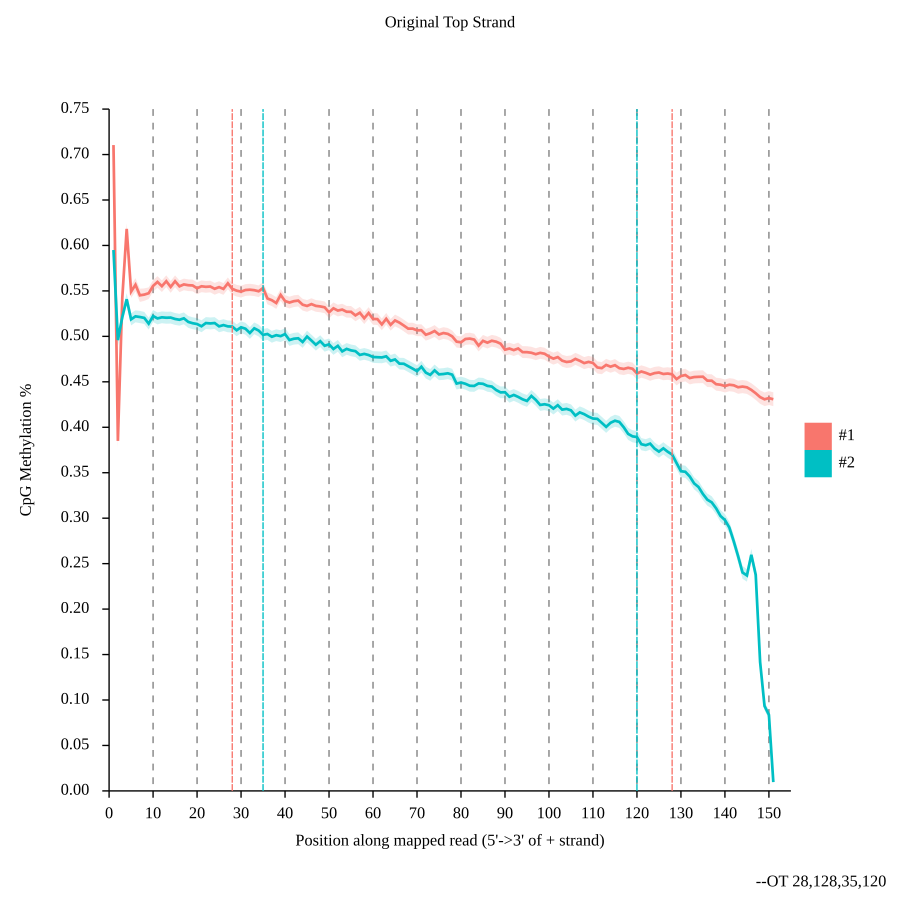
process.4 produces M-bias tables, parsed OT/OB bounds, CpG bedGraphs,
and strand-specific M-bias plots before creating the merged matrix.#
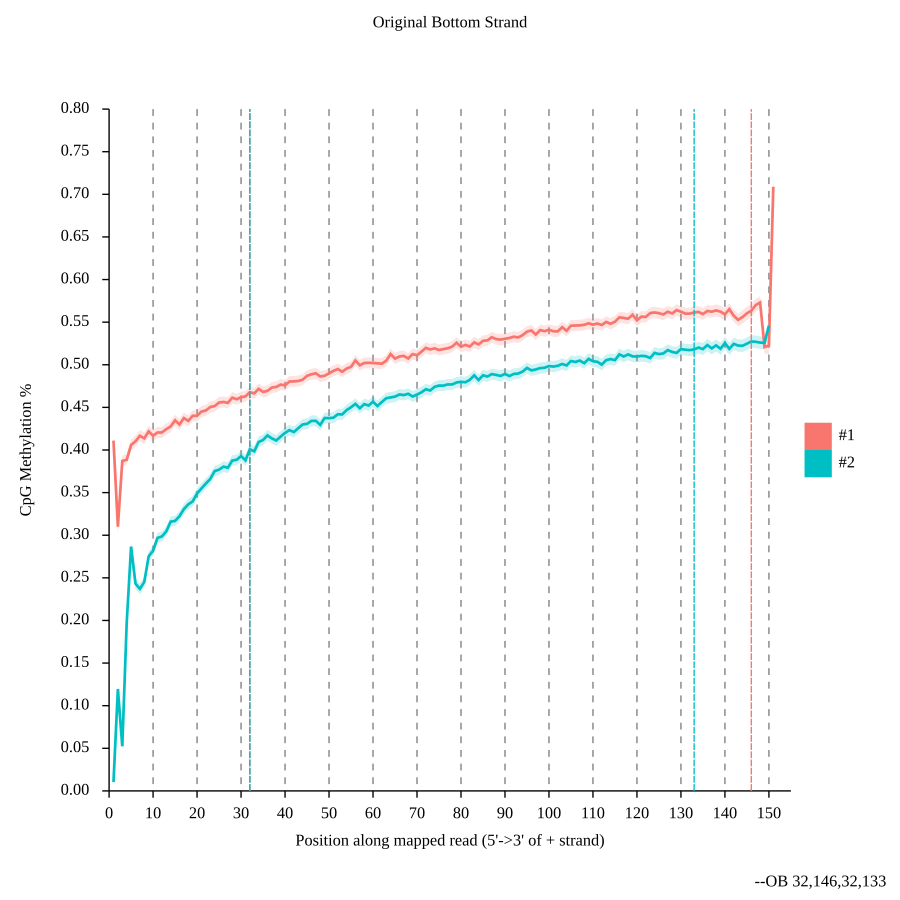
The OB plot is inspected together with the OT plot; neither plot alone is a conversion or sample-quality decision.#
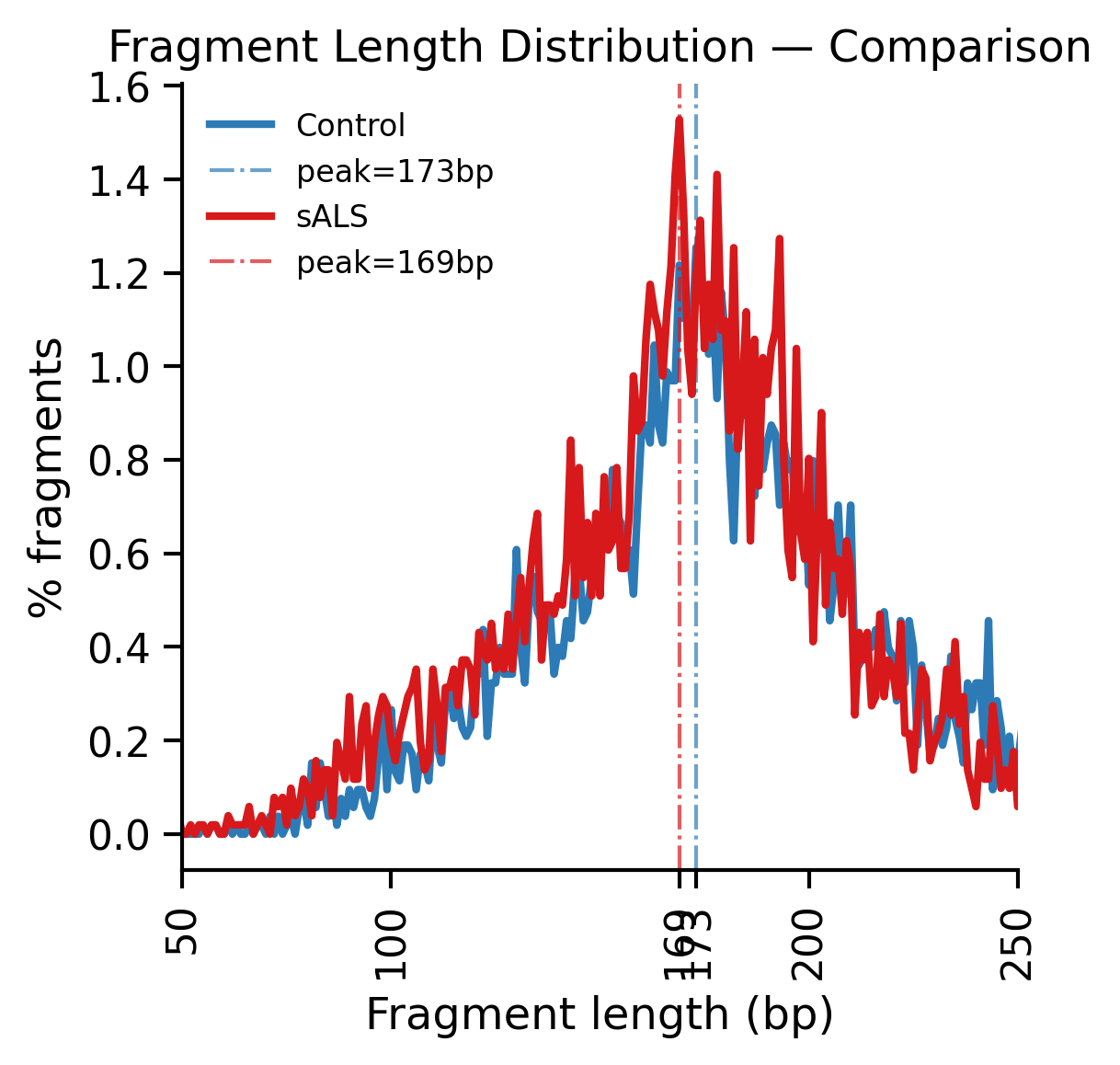
qc.2 produces raw fragment-length tables and per-sample/combined
fragment-length figures. These two curves represent individual examples,
not control/sALS group distributions. The mononucleosomal pattern is
descriptive and must be interpreted with the other QC outputs.#
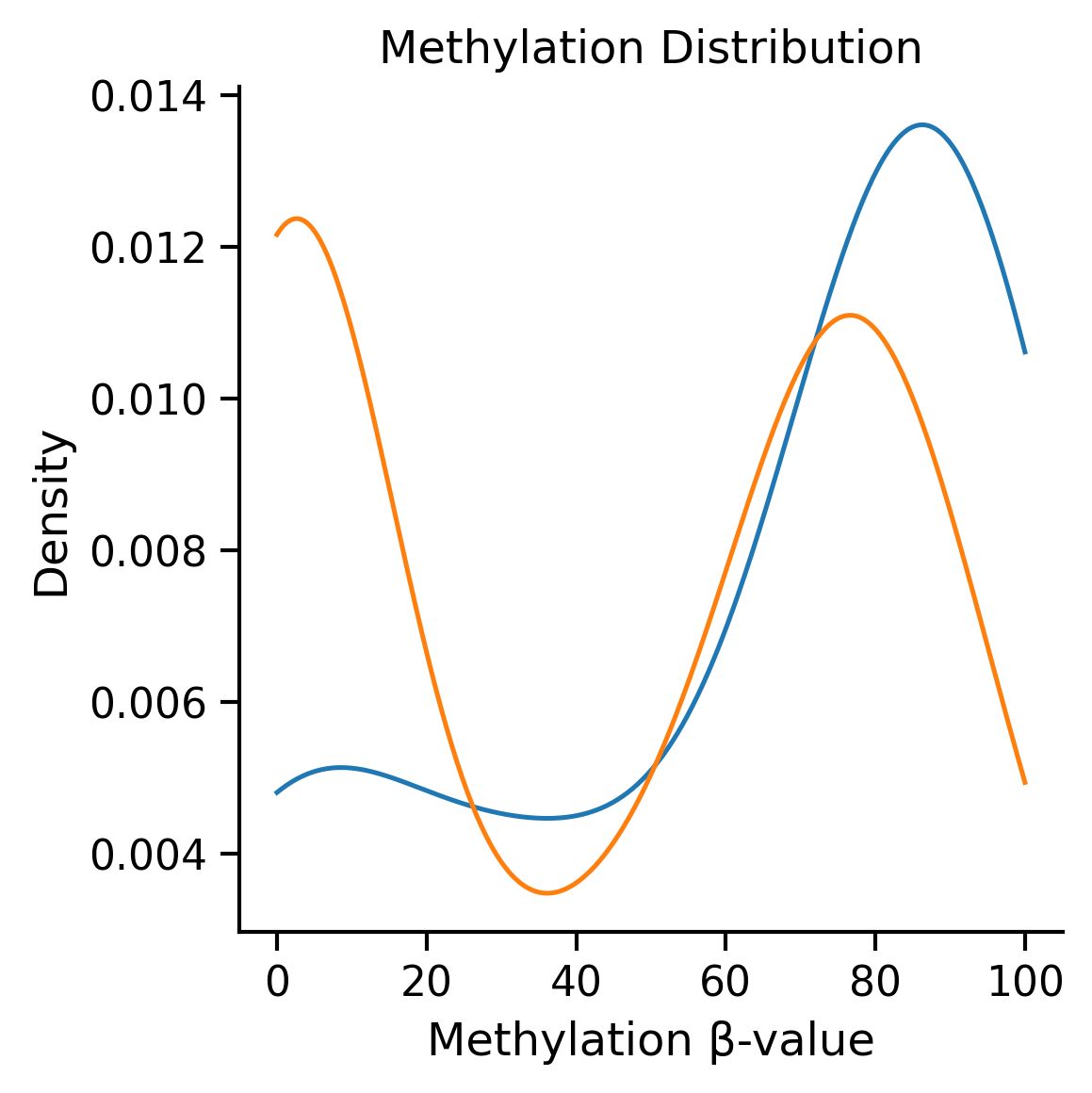
qc.1 produces the methylation-distribution PNG and PDF. qc.0 is
intentionally table-only: its qc_summary.tsv and qc_scores.tsv are
the machine-readable outputs consumed by downstream checks.#
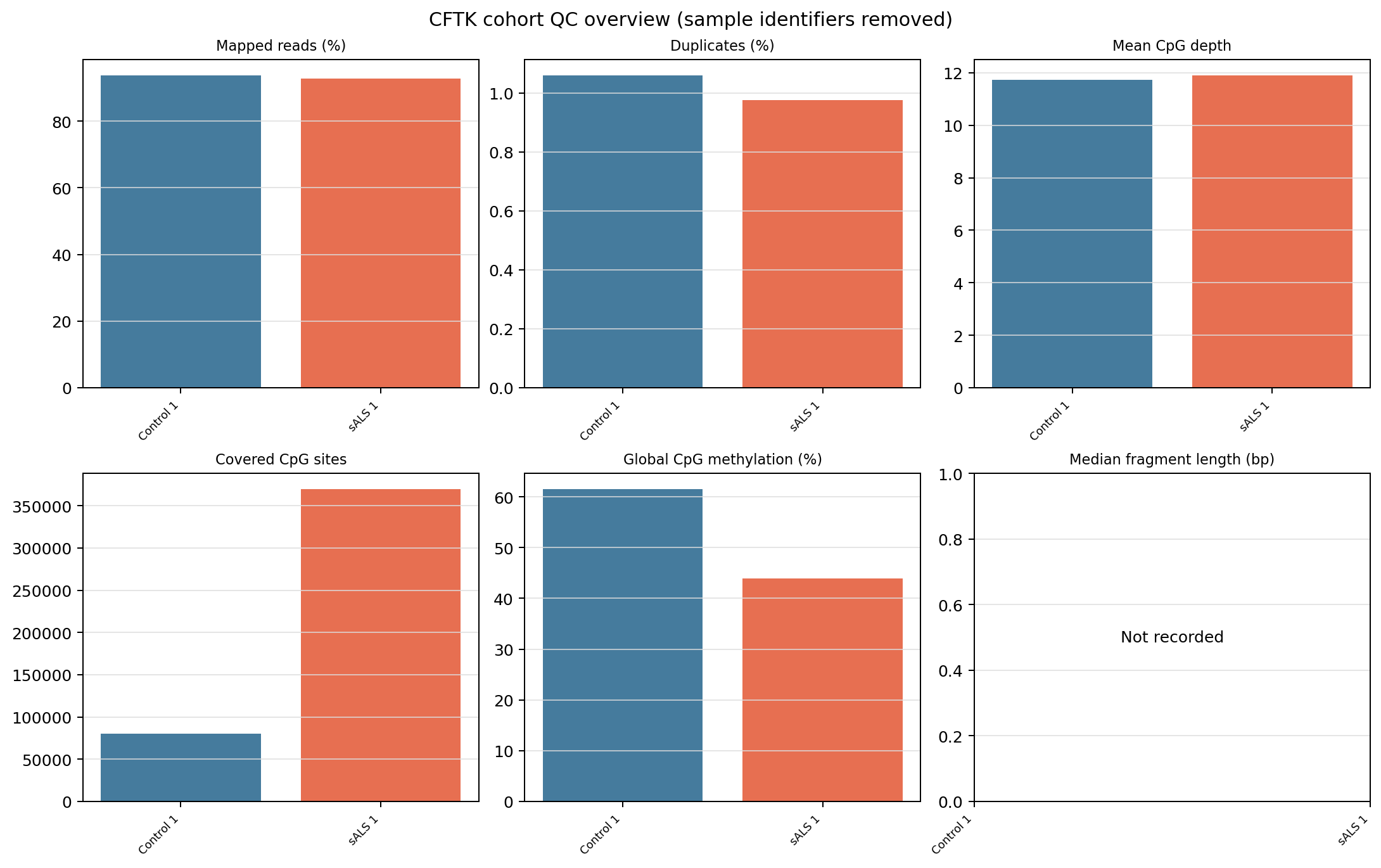
The run-level QC overview contains one sample per group and is a screening
figure generated from qc_summary.tsv. It does not estimate group
behavior or replace inspection of the underlying tables, M-bias plots,
conversion controls, or assay-specific thresholds.#
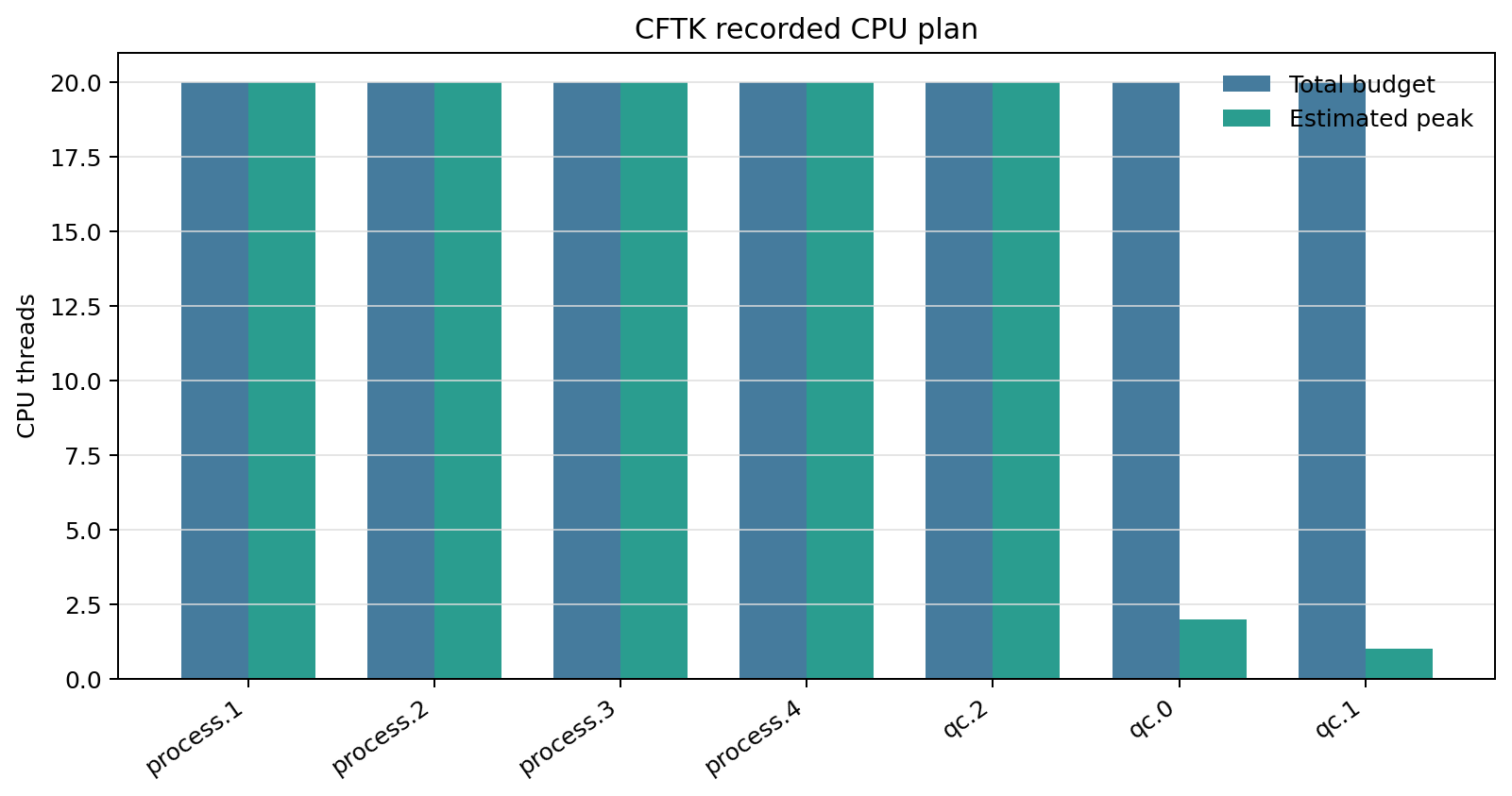
A dry-run also renders the resolved CPU budget and estimated peak threads.
This is a planning figure, not a performance benchmark; the scheduler
allocation and resource-plan.json remain authoritative.#
For a BAM project, process.1 and process.2 are recorded as skipped;
the run starts at duplicate marking. CFTK rejects a project that mixes FASTQ
and BAM rows because such samples do not share the same stage graph.
Add the computationally expensive dinucleotide stage explicitly:
cftk run --qc-dinucleotide
This adds qc.3 and requires its combined PNG and PDF. It is not part of the
default because it creates fragment-level intermediate data and invokes
BEDTools across the BAM cohort.
Plan Before Computing#
Use a dry-run to create the exact stage and artifact plan without probing tools or processing source data:
cftk run --dry-run
The dry-run returns success after writing a planned attempt. Lower-level
commands whose parameters depend on runtime output, such as MethylDackel OT/OB
bounds derived from M-bias, appear exactly in the runtime command ledger rather
than being guessed in advance.
Failure, Resume, And Existing Outputs#
Each new invocation creates a distinct attempt. Automatic resume occurs only
when config, lock, run options, exact CFTK software identity, prior stage
status, and all current artifacts match a recorded CFTK run. File existence
alone is never adopted silently. The software identity is recorded in
run.json and includes the package version, revision/source, dirty state,
and SHA-256 values; it contains no private checkout path.
If a trusted stage was interrupted or one of its artifacts was damaged, CFTK moves its existing stage artifacts into:
results/provenance/quarantine/<new-run-id>/
The original relative paths are preserved and the stage is rebuilt. Nothing is deleted. Outputs created before run manifests existed require an explicit review decision:
cftk run --adopt-existing
A complete stage is validated and recorded as adopted. A partial stage is
quarantined before retry. Without this flag, untrusted existing outputs stop the
run with an actionable error.
Run Records#
Every attempt is stored under:
results/provenance/runs/<run-id>/
File |
Contents |
|---|---|
|
Machine-readable stage states, commands, config/lock/options hashes, expected artifacts, recorded outputs, errors, and timestamps. |
|
Append-only run and stage transition events. |
|
Exact preflight report used to permit or block execution. |
|
Required executable paths and version probe results. |
|
Immediate mirror of this attempt’s exact external command start/finish
records. The project-wide copy remains |
|
Resolved total CPU budget, concurrent samples, per-sample threads, estimated peak threads, and detected scheduler allocation. |
|
Auditable stage-to-artifact inventories. |
|
Portable human summary with relative output links, stage image previews, and links to the generated evidence bundle. |
|
Automatically generated stage, artifact, command, resource, and sanitized QC evidence for this attempt. Tables may contain private paths and commands; the PNG figures use group/order labels instead of sample identifiers. |
results/provenance/latest-run.json points to the newest attempt for
convenience. Prior attempt directories are retained. Archive the project JSON,
sample sheet, lock, run directory, project-wide command ledger, scheduler log,
and software environment together.
Reading The Figures#
The following plots are fixed-seed synthetic examples generated by
docs/_static/generate_synthetic_tutorial_figures.py. They demonstrate
output appearance only: they contain no human-derived data and are not CFTK
validation results.
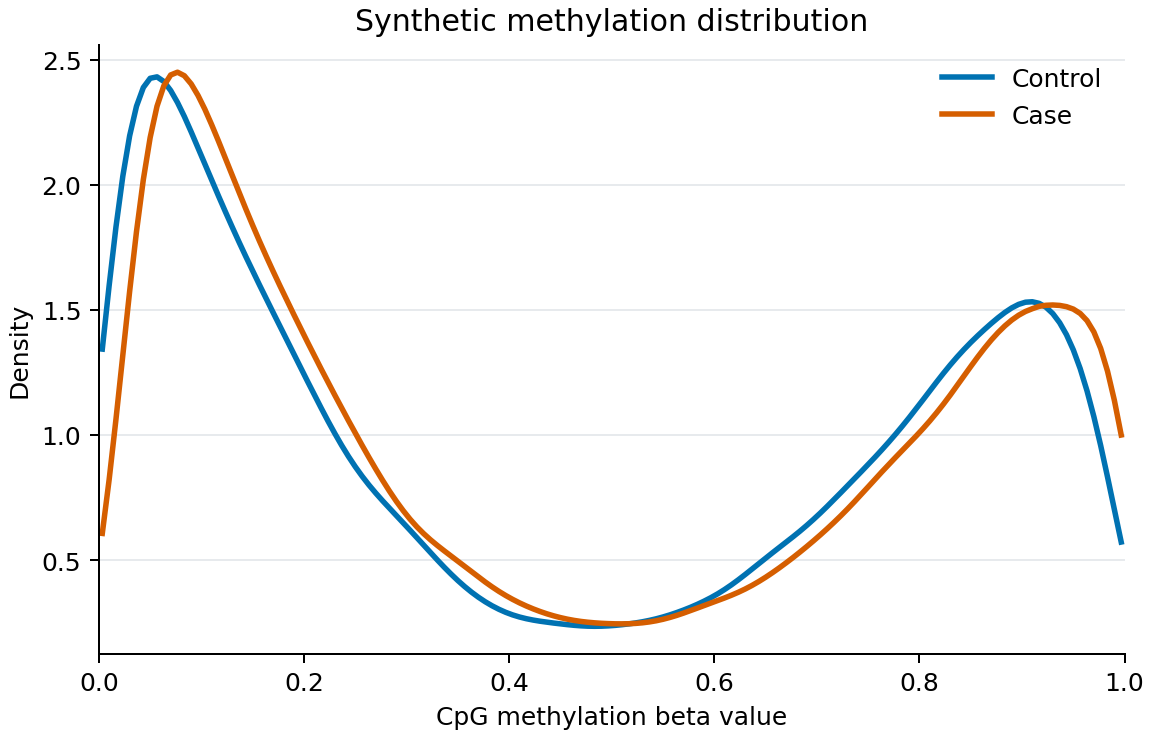
Real methylation profiles should be evaluated alongside coverage, M-bias, conversion controls, cohort design, and assay expectations. A smooth or bimodal curve alone does not prove sample quality.
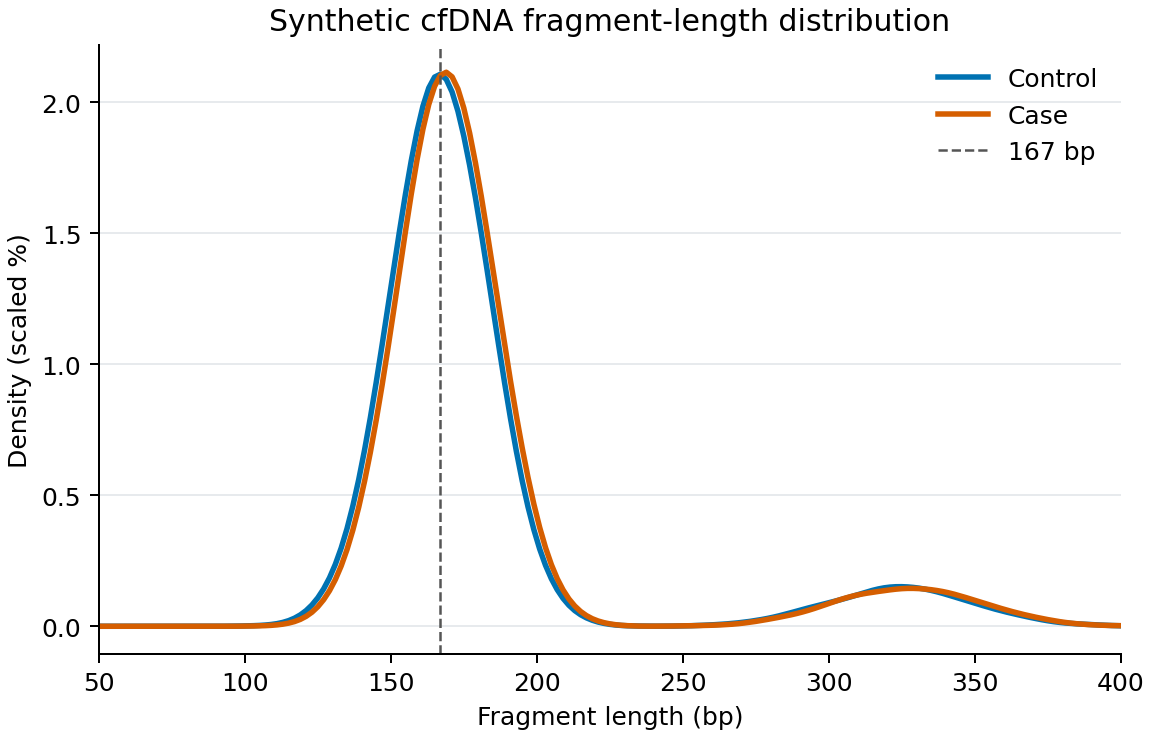
A cfDNA-like mononucleosomal peak can support, but cannot by itself establish, sample identity or suitability. Investigate library preparation, input type, size selection, mapping, duplicates, and contamination when distributions are unexpected.
Automatic Stepwise Evidence Bundle#
Every cftk run attempt generates a private evidence bundle automatically
after it reaches a terminal state: planned, failed, interrupted,
complete, or complete_with_reporting_error. Evidence generation does
not rerun a completed workflow stage.
The bundle is written under:
results/provenance/runs/<run-id>/evidence/
The run summary links the generated tables and previews the available PNG
figures. Raw tables contain absolute paths and exact commands, so keep them
with the private project archive. The displayed QC figure labels use group and
order (for example Control 1) rather than sample identifiers.
For a historical manifest created before automatic evidence reporting, the source-checkout helper remains available:
run_json=$(python -c \
    'import json; print(json.load(open("results/provenance/latest-run.json"))["manifest"])')
python scripts/validation/summarize_workflow_run.py \
    "$run_json" "$(dirname "$run_json")/evidence"
The helper writes the same private tables and figures beside the attempt. Review tables before sharing them because they contain absolute paths and verbatim commands. The figures are safe to use only after confirming that no sample identifiers entered a group label or command annotation:
File |
What it records |
What to check |
|---|---|---|
|
One row and one bar per process/QC stage, with status, exact stage command, required output/report count, required figure count, and missing-artifact count. |
Every required count is present; a |
|
Every expected BAM, table, report, and figure with required/optional, existence, and nonempty checks. |
Required outputs are nonempty and match the stage contract above. |
|
A readable copy of each exact external command start/finish record.
The source of truth remains the append-only |
Each start has a finish, every finish has return code zero, and the command text contains no secrets. |
|
Recorded total CPU budget and estimated peak threads for each stage. |
Peak threads do not exceed the scheduler allocation or configured total-core budget. |
|
Sanitized bars for mapped reads, duplicates, CpG depth/coverage, global methylation, and fragment length when those metrics exist. |
Treat this as a screening view. Investigate raw tables, M-bias plots, conversion controls, and assay expectations before calling a sample usable. |
|
Machine-readable evidence-generation status, artifact counts, resource figure status, QC figure status, and command-ledger completeness. |
|
The collector reports missing artifacts even for a planned dry-run. A planned
run is useful for checking commands and resource allocation, but it is not
evidence that the external tools completed. If analysis stages complete but
evidence generation fails, run.json uses
complete_with_reporting_error and cftk run returns a distinct nonzero
status; rerunning then rebuilds the evidence without rerunning valid stages.
Running On Slurm#
The standard beginner workflow still uses one ordinary scheduler allocation:
put the same synchronous cftk run command in a site-appropriate batch
script, and let CFTK manage bounded sample concurrency. CFTK does not submit
scheduler jobs. For example:
#!/bin/bash
#SBATCH --cpus-per-task=20
#SBATCH --mem=48G
#SBATCH --time=24:00:00
set -euo pipefail
source /path/to/conda.sh
conda activate cftk
cd /path/to/project
cftk run --parallel 2
With the default process.cores: 20, this runs at most two sample commands
at a time and gives each multithreaded tool 10 threads. CFTK records that
calculation in resource-plan.json and displays it in run-summary.html.
If SLURM_CPUS_PER_TASK is present and smaller than process.cores,
cftk doctor and the run preflight fail before data processing.
One-sample-per-job arrays are an advanced option documented in
Downstream Workflow. They require cftk plan --execution per-sample
and an explicit user submission step; they are not needed for the standard
cftk run --parallel N workflow.
Choose memory from the actual data and tool settings. CPU budgeting does not divide memory automatically. Picard’s default maximum is 8 GB per concurrently processed sample, in addition to BAM processing and Python overhead.
Expert Compatibility Command#
run-all remains available for advanced compatibility workflows spanning
downstream analyses. It catches some step failures and continues, has no run
manifest checkpoint contract, and must not be treated as a beginner-safe alias
for cftk run.