Configuration#
CFTK’s beginner setup is a guided command run from the project directory:
mkdir example_study
cd example_study
cftk init
When cftk_init.json is absent and the terminal is interactive, CFTK asks
for project settings and uses the managed default profile. If samples.tsv
is absent, it
discovers only one unambiguous FASTQ R1/R2 pair or one BAM per sample, writes an
editable template, and stops. Fill in the biological fields and rerun
cftk init. CFTK never guesses control and case roles.
Compact Project JSON#
Schema v2 keeps individual sample and reference-component paths out of the project JSON; it retains only one overridable reference-root hint:
{
  "schema_version": 2,
  "project_name": "example_study",
  "output_dir": ".",
  "assay": "twist_human_methylome",
  "genome": "hg38",
  "samples": "samples.tsv",
  "reference_mode": "local",
  "reference_root": "/shared/references/cftk",
  "reference_profile": {
    "id": "twist_human_methylome_hg38",
    "version": "1.0.0"
  },
  "fragmentomics_scope": "auto",
  "process": {
    "cores": 20,
    "parallel_samples": 1,
    "min_depth": 10
  }
}
assay defaults to twist_human_methylome and genome defaults to
hg38. output_dir and samples are resolved relative to the config
file. cores, parallel_samples, and min_depth must be positive
integers; their defaults are 20, 1, and 10. cores is the total CPU budget,
not a per-sample value. CFTK divides it across concurrent multithreaded sample
commands. For example, cores: 20 with parallel_samples: 2 gives each
sample up to 10 tool threads. parallel_samples cannot exceed cores.
Picard commands use an 8 GB maximum Java heap by default. Advanced users can
set process.picard_java_memory to a positive JVM size such as 12g or
4096m.
At runtime CFTK expands schema v2 into the established nested configuration, so processing and downstream commands keep their existing interfaces. Existing legacy nested JSON is still accepted without conversion.
Sample Sheet#
The TSV header is strict and must contain these columns in any order:
sample group role input_type r1 r2 bam
The repository example is:
sample	group	role	input_type	r1	r2	bam
control_1	Healthy	control	fastq	reads/control_1_R1.fastq.gz	reads/control_1_R2.fastq.gz	""
case_1	Disease	case	fastq	reads/case_1_R1.fastq.gz	reads/case_1_R2.fastq.gz	""
sampleUnique output-safe identifier using letters, digits,
-,_, or..groupandroleSchema v2 supports one or two groups. A one-group project is valid for processing and QC and may use role
controlorcase. No biological comparison is inferred for it. A two-group project must have exactly onecontrolgroup and onecasegroup; those explicit roles define model labels 0 and 1, and group names are not interpreted. Comparative commands stop with an actionable error when the project contains only one group.input_typeEither
fastqorbam. FASTQ rows require bothr1andr2; BAM rows requirebam. Input paths are resolved relative tosamples.tsvand must exist during initialization.
Automatic discovery intentionally rejects missing mates, duplicate inputs, mixed FASTQ/BAM inputs for one sample, and multi-lane FASTQs. Represent those layouts explicitly after combining lanes upstream.
Noninteractive Setup#
Batch and HPC setup with the managed default requires only the sample sheet:
cftk init --non-interactive \
  --sample-sheet samples.tsv \
  --project-name example_study
The default managed profile and version are selected automatically. Set
CFTK_REFERENCE_ROOT to use a shared cluster cache.
For an offline or institution-managed local profile, select local mode and one root explicitly:
cftk init --non-interactive \
  --sample-sheet samples.tsv \
  --reference-mode local \
  --reference-root /shared/references/cftk
Use --profile and --profile-version only for a non-default or
version-ambiguous local root. An expert testing a reviewed private registry may
set CFTK_REFERENCE_REGISTRY to its JSON path; this does not relax registry
validation or artifact verification.
CFTK refuses to overwrite an existing config or sample sheet. Pass
--skip-reference-prep only for validation when bwa-meth, .fai, and
Picard .dict companions are managed separately.
Expected Outputs#
After a successful initialization, the project contains the compact settings,
sample metadata, and portable lock identity below. results/ and its
provenance records appear when cftk run starts; the managed reference
profile remains under the selected reference root rather than being copied
into every project.
example_study/
|-- cftk_init.json
|-- cftk.lock.json
|-- samples.tsv
`-- results/                         (after cftk run)
    `-- provenance/runs/<run-id>/
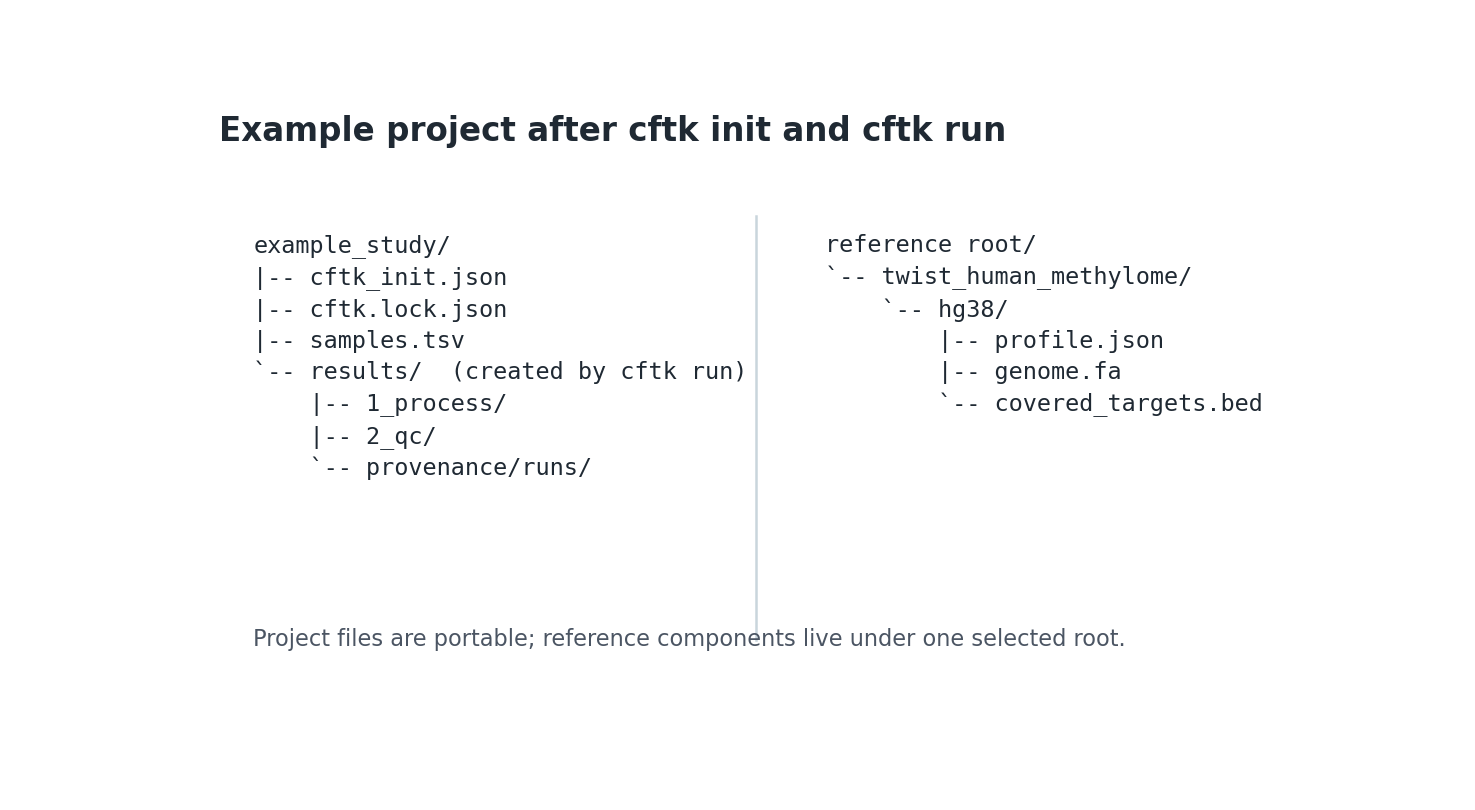
Static documentation example of the project/reference boundary. It is a layout illustration, not a copied patient project or a claim that every reference component is created inside the project directory.#
Reference Root And Lock#
Only the reference root is public. Component paths are derived from the
profile manifest under <root>/<profile>/<version>. Runtime root precedence
is CFTK_REFERENCE_ROOT, then reference_root in JSON, then
~/.cache/cftk/references. This lets the same project move between a laptop
and cluster without rewriting individual paths.
Initialization writes cftk.lock.json atomically. It records the project
config hash, sample-sheet hash, profile ID/version, manifest hash, every
component hash, and managed registry-entry hash when applicable, but no
reference-root path. Regenerate the lock with
cftk init after an intentional config, sample, or profile change.
Legacy Configuration#
Legacy configs continue to expose comparison, nested samples,
reference_data, process, and analysis. The repository-root
cftk_init.json remains the complete legacy example. New projects should use
schema v2 because it avoids repeating file paths and tool defaults.
Advanced Fragmentomics Scope#
The default Twist Human Methylome profile is a targeted panel. CFTK therefore
uses fragmentomics_scope: auto for WPS, occupancy, and DELFI: it creates
panel-overlap regions and panel-read BAMs under
results/4_fragmentomics/_scope/. Those
outputs are panel-restricted, not genome-wide measurements. A custom targeted
profile can opt in with fragmentomics_scope: panel; a validated whole-genome
project can override this with fragmentomics_scope: genome. The equivalent
one-run CLI override is --fragmentomics-scope genome on cftk frag,
cftk plan, or cftk analyze.