Downstream Workflow#
cftk run finishes core processing and QC. For the ordinary beginner
workflow, request downstream analysis explicitly after that run:
cftk run --downstream auto
This reuses valid core and downstream artifacts automatically, generates the
downstream evidence, and links the downstream manifest and summary from the
core run summary. The auto preset also includes the self-contained HTML
report. The differential preset also refreshes that report after its
feature-level outputs are ready. Other presets run only their selected stages
unless report is included explicitly. The core and downstream manifests
remain separate and immutable so each stage retains its own provenance and
resume contract.
Use cftk plan before a large or expert downstream analysis when you want
to inspect required matrices, BAMs, reference components, optional Python
packages, external executables, CPU allocation, and the exact output contract
without processing data.
cftk plan
cftk analyze --dry-run
cftk analyze
cftk analyze --preset differential --modality cpg
auto is intentionally bounded. For a one-group project it selects
occupancy, WPS, and an HTML report. For an explicitly role-defined two-group
project it adds differential analysis. DMR calling and MESA modeling are
available through explicit presets because they introduce R/external-tool and
modeling dependencies that should be inspected before a large run.
When configured differential or MESA modalities include occupancy or WPS and their matrices do not yet exist, CFTK adds the corresponding feature stage and runs it before the dependent analysis. The resolved order and dependency edges are recorded in the plan; other configured modalities must already provide a matrix or preflight remains blocked.
Select Differential Modalities#
Initialization records cpg, occupancy, and wps as the default
differential modalities. Override that list for one managed run without
editing JSON:
cftk plan --preset differential --modality cpg
cftk analyze --preset differential --modality cpg
cftk analyze --preset differential --modality cpg occupancy wps
The resolved list is stored in the plan, manifest, and reconstructed stage command. CFTK adds occupancy or WPS producers when those matrices are selected, then reuses valid unchanged outputs automatically. Each selected matrix is recorded with its SHA-256 content signature at the differential stage. If its content changes, CFTK reruns the differential stage instead of reusing stale results. A missing requested matrix that has no selected producer fails preflight with its expected path.
Targeted-panel scope#
The default Twist Human Methylome assay is a capture panel. For the WPS,
occupancy, and DELFI stages, auto therefore creates a deterministic scope
under results/4_fragmentomics/_scope/: reads are filtered to alignments
overlapping the profile target_bed, WPS/occupancy regions are clipped to
panel overlap, and DELFI bins are clipped to panel overlap. The plan, doctor
report, run manifest, stage-local fragmentomics_scope.json, and canonical
scope.json repeat this limitation so panel-level features are not mistaken
for genome-wide measurements. The HTML summary and machine-readable evidence
also show the target identity and derived interval counts after execution. Use
--fragmentomics-scope genome only for validated whole-genome inputs, or
--fragmentomics-scope panel for a custom targeted profile.
For the DMR preset, preflight verifies that Rscript can load the packages
used by CFTK’s bundled annotation script: annotatr, GenomicRanges,
org.Hs.eg.db, and TxDb.Hsapiens.UCSC.hg38.knownGene. The managed DMR
stage uses every sample in the two role-defined groups unless
analysis.dmr.samples explicitly selects a subset. It records the resolved
sample names and SHA-256 signatures of the selected CpG bedGraphs, so changed
inputs invalidate stale DMR outputs automatically. The DMR preset includes a
final report refresh.
cftk plan --preset comparative
cftk analyze --preset dmr
cftk analyze --preset mesa
cftk analyze --preset fragmentomics
cftk analyze --preset all
The comparative and all presets require exactly one control group and
one case group from the schema-v2 sample-sheet role column. CFTK does not
derive labels from group names. One-group occupancy and WPS analyses remain
valid descriptive workflows.
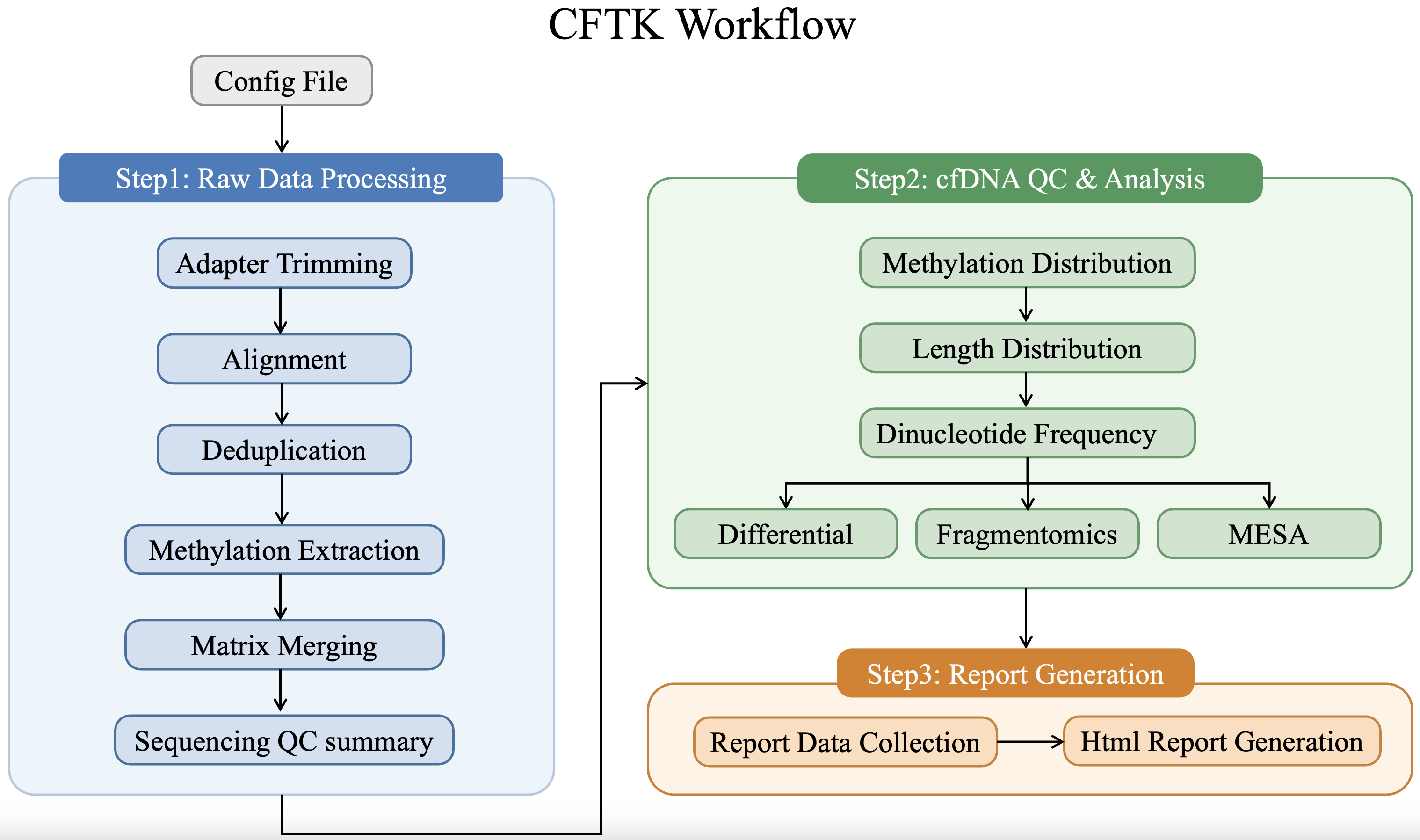
Downstream analysis starts only after the processed BAMs, CpG bedGraphs, matrices, and QC outputs needed by the selected stages are present.#
Expected Outputs#
Every cftk analyze attempt writes an immutable record under
results/provenance/analysis-runs/<run-id>/. It contains run.json,
doctor-before.json, analysis-plan.json, exact external command records,
expected-outputs.tsv, figures.tsv, resource-plan.json, an HTML
summary, and an evidence/ directory with artifact, stage, command, and
resource summaries.
Selected stages add their existing result files without changing their output locations:
differential:
results/3_differential/<modality>/differential_result.tsv, PCA tables, and PCA/violin/heatmap PNG and PDF files;DMR:
results/3_differential/dmr/metilene_input.bedGraph, raw and annotated DMR BED files, and a volcano plot;fragmentomics: per-sample occupancy, WPS, DELFI, end-motif, or cleavage outputs under
results/4_fragmentomics/with corresponding figures where the selected workflow provides them;MESA:
modality_performance.tsv,MESA_model.pkl,loocv_predictions.tsv, and ROC/heatmap/Spearman figures underresults/5_mesa/;report:
results/report/report.html.
The differential report section shows the discovered modality tables, effect direction, result-row count, links to full TSV files, the ten lowest-q rows per modality for navigation, and PCA/violin/heatmap figures. The displayed rows do not apply or imply a significance threshold.
Advanced: Per-Sample Jobs#
The normal execution model is local, bounded in-process parallelism through
cftk run --parallel N or the corresponding direct command. Use the
per-sample task plan only when you intentionally want one scheduler job per
sample or need to connect CFTK to an institutional workflow engine. For an
expensive fragmentomics stage, generate a per-sample task plan instead:
cftk plan --stage delfi end_motif --execution per-sample
Differential analysis itself compares the full cohort and is therefore never split into one sample per job. Per-sample plans can accelerate selected fragmentomics matrix producers; their success-gated finalizer must complete before the cohort-level differential stage runs.
Each generated task runs one sample with --parallel 1 --no-finalize and
therefore has its own terminal status, command-ledger entries, and retry
boundary. After every task for a stage succeeds, its generated finalizer checks
the full cohort, creates any cohort matrix/figures, and adopts the result into
the standard immutable cftk analyze manifest. Do not run a finalizer after
a failed or incomplete sample task.
The plan is scheduler-neutral: its executable scripts can be submitted by Slurm, PBS, SGE, or an institutional workflow engine. Clusters using Slurm may request an array helper:
cftk plan --stage delfi --execution per-sample --slurm
CFTK_SBATCH_ARGS='--cpus-per-task=8 --mem=48G --time=12:00:00' \\
  results/provenance/job-plans/fragmentomics-*/slurm/submit.sh
The helper is written but never submitted automatically. Set its resource arguments from the chosen stage and local policy. It submits one array element per sample and a success-gated finalizer job. This does not change FinaleToolkit parameters or CFTK output schemas; it only moves independent sample work into separate scheduler jobs.
While an advanced plan is in use, inspect its observed artifacts and whether a
cohort finalizer is ready with cftk status. This is deliberately separate
from Slurm/PBS/SGE status: the scheduler remains the authority for queued,
running, canceled, and failed jobs.
Core Processing And QC Jobs#
The same scheduler-neutral plan is available for the long-running core processing steps. It writes one task script per sample, then a finalizer that validates the complete stage before allowing the next stage to start:
cftk plan --workflow core --execution per-sample --slurm
Use --workflow process --stage 3 or --workflow qc --stage 2 to plan a
single family/stage. The generated sample commands include --parallel 1 and
--no-finalize; the finalizer performs MultiQC, CpG-matrix merging, or
cohort plotting only after every sample task succeeds. Process step 3 also
checks the covered-target Picard metrics requested by the default Twist assay.
Only QC step 2 (fragment length) is split across samples. QC steps 0, 1, and 3 produce cohort-level summaries or reference-dependent tables, so they should be run once after the sample-level plan completes. A BAM-only project automatically skips process steps 1 and 2 in a core plan. The Slurm helper is an artifact for the user to submit under their own lab account; CFTK does not submit jobs.
Resume And Method Boundaries#
Successful stages resume when the configuration, lock, exact CFTK software
identity, and required artifacts agree. A complete stage recorded by any
compatible prior analysis selection is validated and reused automatically when
a later full suite includes it. Historical manifests remain readable, but
their missing software identity makes them ineligible for automatic reuse;
use an explicit adoption decision when appropriate.
Existing untracked outputs with no trusted stage manifest still require
--adopt-existing; partial retry outputs are quarantined under
results/provenance/quarantine/.
Differential reuse also requires the current selected matrices to match the SHA-256 signatures recorded by the trusted stage. Older differential manifests without these signatures are not silently trusted for automatic reuse.
This orchestration layer does not change the scientific implementation of its
stages. The current differential command uses feature-level Mann-Whitney tests
with BH correction. The current DMR stage uses metilene followed by the bundled
R annotation route; it is not the covariate-adjusted beta-regression/DMRcate
workflow. MESA uses the installed mesa-cfdna package with explicit labels.
Choose or validate a different scientific method explicitly rather than
assuming that a workflow preset changes it.